
ptop: Pate's top, a copy of vtop in Rust
I like vtop. I wanted a more performant version that works exactly the same, so I made ptop, short for Pate's top. It's a copy of vtop, rewritten in Rust.
The dotted graphs are the point. So are the process list, the keyboard controls, and the themes. I wanted to keep the terminal monitor I already liked and reduce the resources it uses to tell me what is using my resources.
The code is on GitHub, and the native executable is available as @patebryant/ptop on npm.
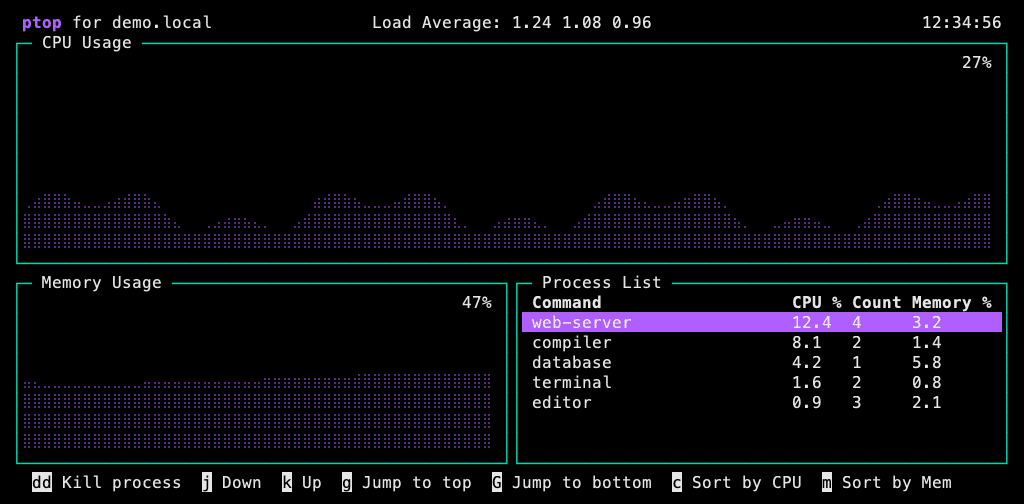
Rendered by ptop using synthetic demonstration data. The font depends on your terminal.
Try ptop
ptop runs on macOS and Linux. The installation method depends on your platform.
macOS: install from npm
For Apple Silicon Macs running macOS 15 or later, install the prebuilt native package:
npm install -g @patebryant/ptop
ptop
Press q to quit. You don't need to install Rust. npm distributes the compiled native executable; there is no resident Node wrapper or install-time binary download.
Linux: install from source
Linux has its own CPU and memory sensors, and Ubuntu builds, compatibility checks, and live-terminal tests run in CI alongside macOS. With Rust 1.92.0 installed and the usual Linux tools (ps, free, hostname, and killall) available:
cargo install --git https://github.com/patebry/ptop --locked
ptop
The npm package currently includes only the macOS ARM64 binary. That is a packaging limit, not a Mac-only limit on ptop itself. Other Linux distributions and CPU architectures have not all been verified, and Intel Mac source builds are not yet verified.
How close is it to vtop?
Matching vtop's appearance and behavior is the goal, including its dotted CPU and memory history, process grouping, sorting, keyboard navigation, mouse selection, and 12 themes. The reference is vtop 0.6.1.
The test harness checks 90 fixture frames against the upstream renderer, plus a separate ptop branding frame. It also tests command-line output, input handling, sensor timing, and terminal restoration. Those checks give us specific evidence of compatibility; they don't prove every possible terminal and workload behaves identically.
A few differences are deliberate. It says ptop, the old footer link is gone, and updates are manual. Normal ptop does not poll npm in the background or invoke sudo to update itself.
For reference testing, --vtop-parity restores vtop's branding, footer, and updater behavior. For everyday use, just run ptop. The optional --fix flag corrects vtop's macOS memory arithmetic; the default retains the compatibility behavior.
Does rewriting vtop in Rust actually help?
For the workload I measured, yes. These are the published ptop 0.1.0 vs. vtop 0.6.1 results, not a new benchmark of the 0.1.1 or later packages:
| Measurement | vtop 0.6.1 | ptop 0.1.0 |
|---|---|---|
| Mean own-process memory (RSS) | 111.18 MiB | 7.31 MiB |
| Mean CPU, percent of one core | 27.20% | 23.02% |
That's about 93% less own-process RAM and 15% less CPU in this comparison.
I ran three matched 20-second pairs on an Apple M2 Max with macOS 15.4.1, using a 100 × 30 terminal, a 300 ms update interval, the parallax theme, and mouse input disabled. ptop used its vtop compatibility mode. CPU accounting includes reaped sensor child processes; the RSS samples measure the monitor itself, not its whole process tree.
This is one local workload. Process count, terminal size, update interval, and whatever else your machine is doing all affect the result. Rust alone isn't proof of a speedup.
The full benchmark report and raw measurements are in the repository, along with instructions for running your own comparison.
Same dots, familiar controls
Use j and k to move through processes, c to sort by CPU, and m to sort by memory. Mouse selection and scrolling work too. To change the look:
ptop -t nord
All 12 themes ship with the binary. The README has the full control list, build instructions, and compatibility notes.
ptop is MIT licensed, with credits and notices for vtop and the projects it builds on. vtop deserves the credit for the interface. I just wanted my own Rust version with a smaller footprint. And apparently an excuse to make a ridiculous launch commercial.
Install ptop from npm or read the source on GitHub. If you find a behavior that doesn't match vtop, open an issue with your terminal size, theme, platform, and reproduction steps.